

LocalBusiness Schema in Plain English: The Code That Helps AI Trust Your Website
LocalBusiness schema markup is a small block of code that sits inside your website and tells search engines exactly what your business is, where it operates, and how to describe it in search results. The idea behind it is simpler than the technical name suggests. Schema markup is the language search engines and AI assistants speak, so the right structured data is how you make sure they describe your business accurately when a prospect asks Gemini or ChatGPT for a recommendation.
This blog explains what local business schema is, why it matters for local rankings and AI search in 2026, and how to check whether your website already has it. Nothing here requires you to write code yourself. (Phew). Our goal is to give business owners enough understanding to ask the right questions of whoever runs their local SEO services, and to spot quickly when something is missing.
What Is LocalBusiness Schema Markup?
LocalBusiness schema markup is a type of structured data built on the Schema.org vocabulary, which is the shared library that Google, Bing, and the major AI assistants use to understand information on the web. The Schema.org definition describes a LocalBusiness as a particular physical business or branch of an organization, with examples ranging from a restaurant to a medical practice to a branch of a restaurant chain.
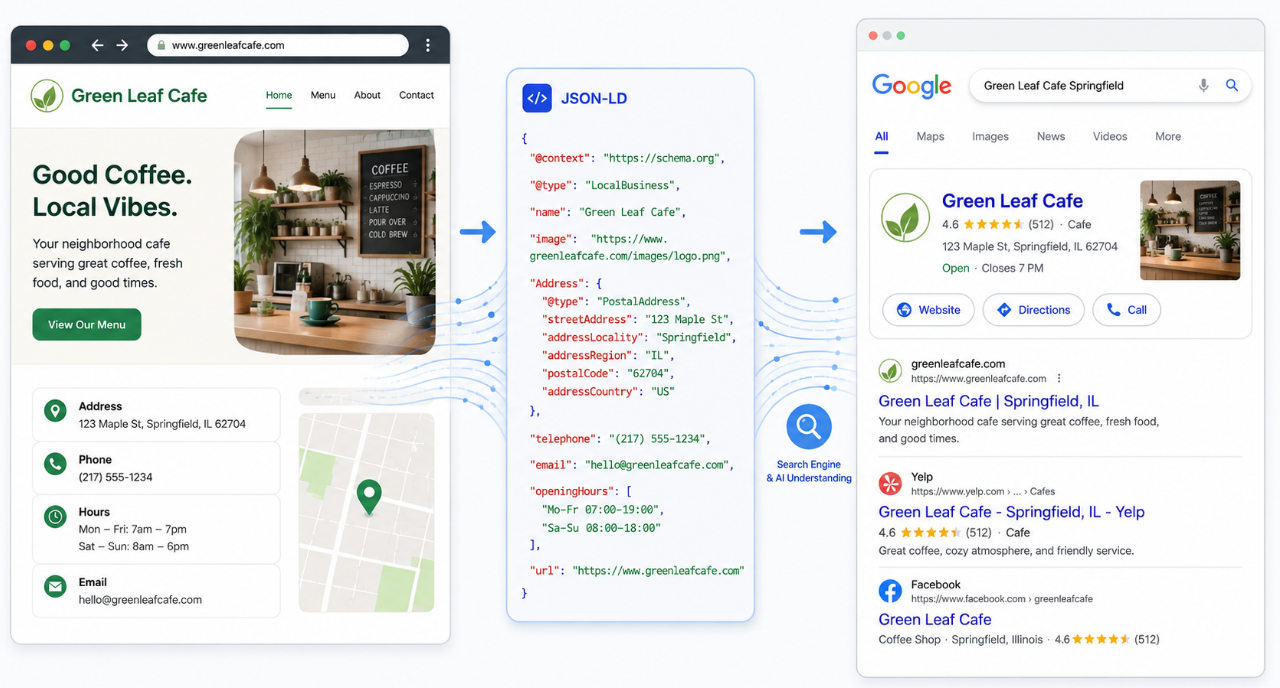
But what does this mean? Well...in practice, the markup is a short script that sits in the HTML of your website and labels the important details about your business so a machine can read them without guessing. This means that your business's name, address, phone number, hours, services, geo coordinates, and aggregate review rating each become a tagged data point that any crawler can interpret at a glance.
The format most commonly used today is JavaScript Object Notation for Linked Data, written as JSON-LD, which Google recommends because it stays cleaner and easier to maintain than older formats.
It's also worth knowing that the schema itself remains invisible to readers, even though the same information humans read in paragraphs and headings gets translated into a format search engines understand instantly.
Why Local Business Schema Matters for AI Search and Local Rankings
AI search engines have changed how a local business gets found in 2026. When someone asks Gemini, ChatGPT, or Perplexity for a recommendation, the assistant looks for trusted, structured signals that confirm your business is real and a fit for the query before naming it in an answer. Schema markup is one of the strongest signals you can give it.
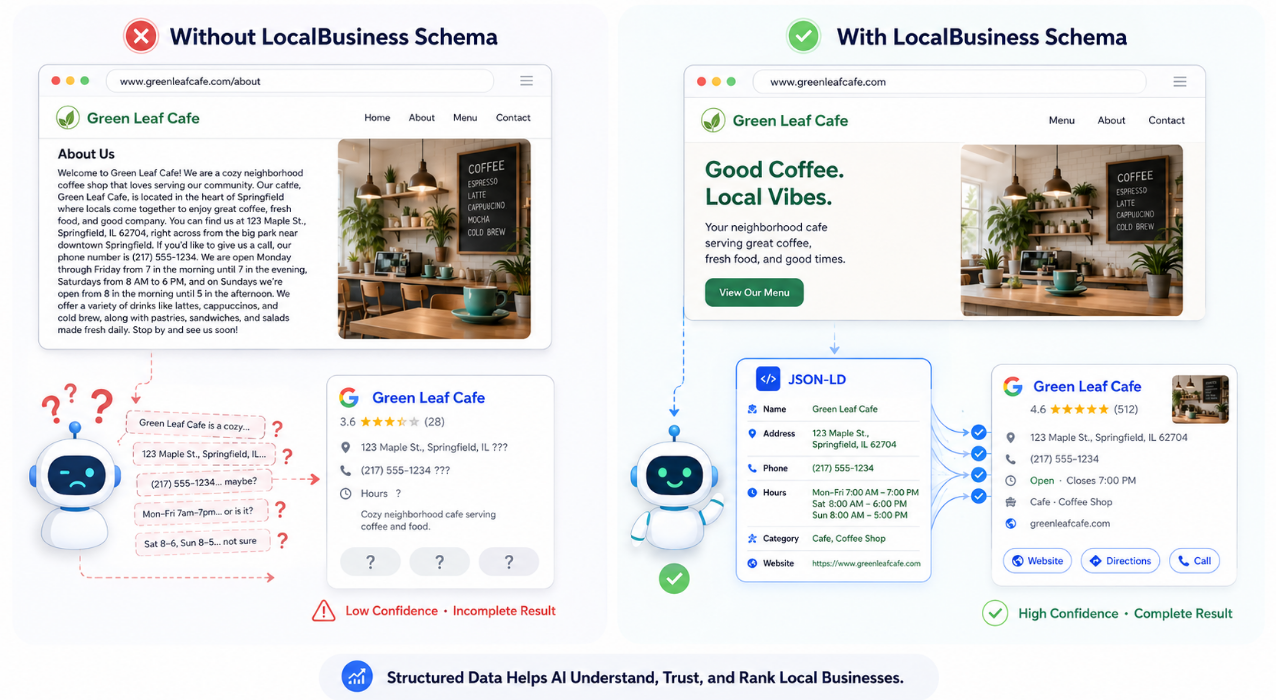
Without schema, search engines and AI assistants have to interpret your website by parsing prose, which leaves room for error and missed details. With it, your business address, business hours, and core details are presented as clean data the moment a crawler arrives.
Google's own LocalBusiness structured data documentation confirms that this kind of markup helps pages appear in enhanced search features like Knowledge Panels, the local pack, and Google Maps, and it now feeds the AI Overviews that already appear on roughly 40 percent of local queries.
The same signal feeds directly into local listing accuracy across the wider web. So, Schema on your website is the on-site half of a much larger trust signal, while the off-site half is your business appearing with the same name, address, and phone across Google, Bing, Apple Maps, and the directory listings that AI search engines pull from when forming an answer.
What LocalBusiness Schema Looks Like on a Real Website
A working block of LocalBusiness schema is short, and seeing one usually demystifies the whole topic. It lives inside the head section of a webpage and reads like a tagged list of business details written in JSON-LD. The example below shows the essentials, simplified for readability.
@type. LocalBusiness
name. The Coffee Mill Cafe
address. 145 Main Street, Columbus, OH 43215
telephone. (614) 555 0142
openingHours. Mo-Fr 07:00-18:00
That handful of lines is enough to tell a search engine what kind of business this is, where it is located, when it is open, and how to contact it. If you multiply the same approach across a few dozen recommended schema properties, search engines can build a complete picture of your business without ever interpreting body copy. So you can understand why local business schema markup is so important.
Required Schema Properties Every Local Business Should Include
Google's documentation flags two schema properties as required for any local business to qualify for rich results, and those two are the business name and the business address. Miss either one and the markup loses Knowledge Panel eligibility entirely. This matters because structured data markup only works when the core business details are complete enough for Google to trust, display, and connect them to the right local result.
Also, the address itself needs to follow the PostalAddress schema, which means street address, city, region, postal code, and country, each tagged separately rather than written into a single line. That separation is exactly what helps search engines pin down your specific business location unambiguously, because a real address, parsed into discrete fields, will always outperform the same address buried in a sentence.
Recommended Properties That Strengthen the Markup
Beyond the required fields, the recommended properties are where most local businesses sadly leave value on the table. Each one adds a measurable amount of information that search engines and AI assistants can use to describe your business more accurately in 2026 search results:
Business phone number as the primary contact method, formatted with country code.
Opening hours with separate entries for any seasonal business closure or special schedule.
Geo coordinates (latitude and longitude) to confirm your physical location precisely.
Price range, with a relative price range marker shown either as a numerical range or as dollar signs.
URL and social media accounts connecting your website to verified profiles.
Aggregate rating when you have enough verified Google reviews to support it.
At the end of the day, the more accurate data you provide through these recommended properties, the more confident a search engine becomes in how it describes your business when an AI assistant comes asking. That confidence is what earns your business the enhanced search features, rich snippets, and higher click-through rates that follow.
How to Add LocalBusiness Schema to Your Key Pages
LocalBusiness schema belongs on the key pages that represent the business itself, not on every page across the site. The homepage is the primary location for most single-location businesses, and for multi-location businesses, each location page gets its own markup with the specific business location it represents.
A contact page or an about page can also carry the markup where it makes sense, although duplicating it everywhere is unnecessary and can confuse search engines if the data drifts out of sync across pages.
Given this can be a little tricky, it's best to learn more about implementation and how it usually happens in one of three ways.
A developer adds the JSON-LD script directly into the page template.
A content management system plugin generates it automatically based on business details entered once.
Your Google Business Profile management provider builds and maintains it as part of the broader local SEO work.
For owners who would rather not touch code, the third option usually delivers the cleanest result and the fewest surprises, and at Locallogy, we can help with this.
Common LocalBusiness Schema Details to Get Right
A few LocalBusiness schema details are worth checking before the markup goes live because they affect how clearly search engines read your business information.
For starters, business hours should use the Schema.org openingHoursSpecification format when your hours change by day, season, holiday, or temporary closure. This gives search engines a cleaner way to understand when the business is actually open instead of pulling that information from a paragraph on the page.
Secondly, multi-location businesses should also avoid using one generic block of schema across the whole website. Each location page should have its own LocalBusiness markup with the correct address, phone number, hours, and location-specific URL.
Then, the same logic applies to business categories. If Schema.org offers a more specific type for your business, such as Restaurant, Dentist, or MedicalBusiness, use the most accurate option instead of stopping at the broader LocalBusiness type. You'll thank us later.
How to Check Whether Your Schema Is Working
Two free tools will tell you within minutes whether your schema implementation is working.
Google's Rich Results Test takes any public URL and shows which structured data Google detects, which rich results the page qualifies for, and any errors it finds along the way.
The Schema Markup Validator is the broader Schema.org tool, which is useful for checking syntax and verifying that your markup follows the official vocabulary down to the schema property level.
Additionally, inside Google Search Console, the Enhancements section reports on structured data sitewide and flags any pages with errors or warnings as they appear.
Most business owners we work with discover during this check that their site either has no LocalBusiness schema in place or has outdated markup pointing at an old address or phone number from a previous version of the business. Both are easy fixes once you know they exist, and both are quietly costing visibility every day they go unaddressed.

Ready to Find Out Whether Your Schema Is Actually Working?
When LocalBusiness schema is implemented correctly, the benefits show up across every surface where your business appears in 2026.
Search engines understand your business address and hours instantly, rich snippets and Knowledge Panel features become eligible, AI assistants are more likely to cite your business when answering local search queries, and click-through rates rise on the listings that do appear because enhanced search features make your result more visible than the plain blue links around it.
Pair that foundation with a steady local digital marketing presence, and your local visibility holds up to whatever Google and the AI search engines change next.
So, if you finished this blog wondering whether your own site has the right structured data in place, that is exactly the audit worth running. Locallogy reviews schema implementation as part of a free technical audit, alongside the rest of the signals that decide whether AI search and local rankings work in your favor. Send us your website, and we will tell you what is there, what is missing, and what to do about it.
Get the Latest Content in Your Inbox
Want to be the first to know about new content? Sign up to get our weekly blog posts sent to your email!